TABLE OF CONTENTS
Introduction
On rare occasions the cookies used by Cooper8 website may get "corrupted" in Edge (it does not happen in Chrome!).
This article is intended to guide you though some quick steps to resolve this issue, by clearing the cookies for Cooper8.no.
Steps to clear cookies
Start by pressing the "..." dots at the upper corner of your Edge browser:

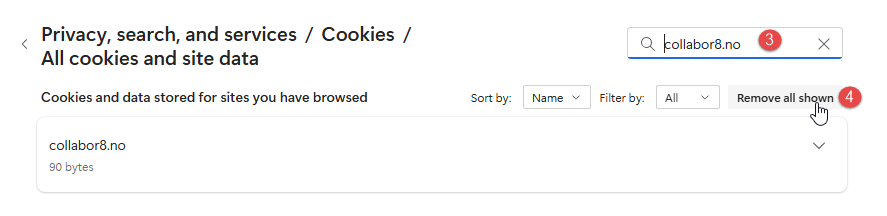
Then press (1) and then (2) as illustrated below: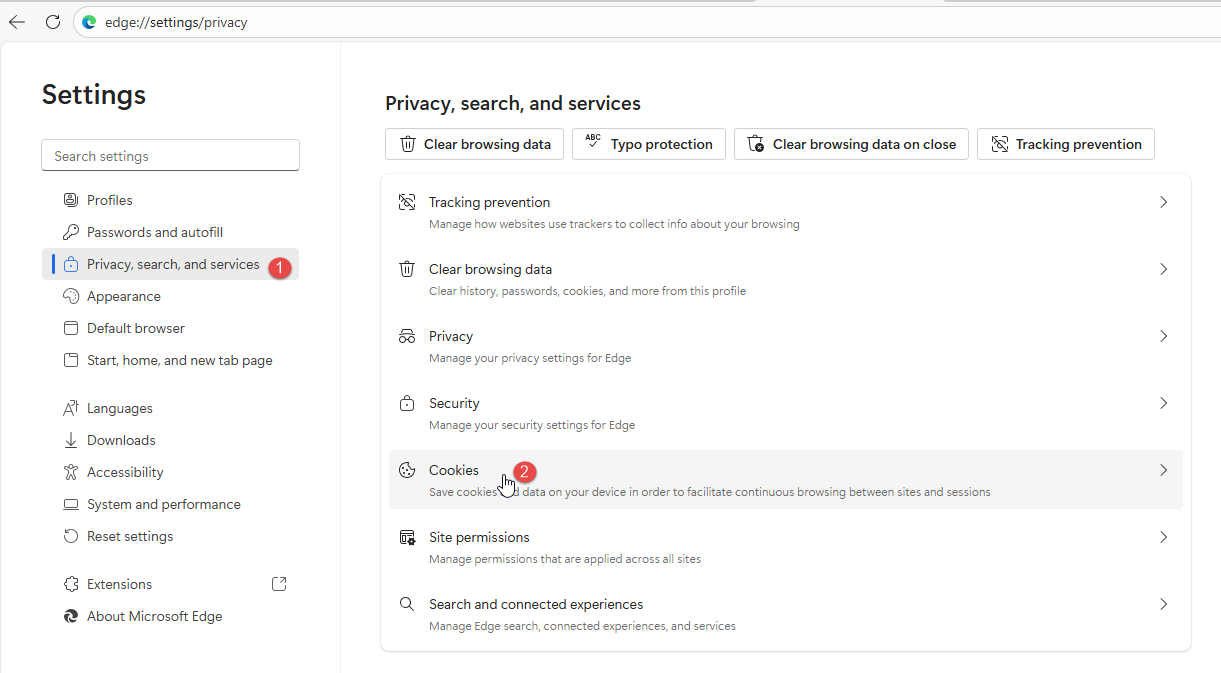 Finally, type "cooper8.no" in the search-box, seen at (3), followed by pressing "Remove all shown" at (4):
Was this article helpful?
That’s Great!
Thank you for your feedback
Sorry! We couldn't be helpful
Thank you for your feedback
Feedback sent
We appreciate your effort and will try to fix the article