TABLE OF CONTENTS
Introduction
SchedEx keeps a few small personal preferences that only affect your own view — not anyone else's, and not any data. You reach them from the Settings menu in the top bar. This guide explains each one so you can set them once and move on.
Where to find it
Open the Settings menu from the icon in the top bar (header). The preferences below apply immediately — there is no separate "save".
The preferences
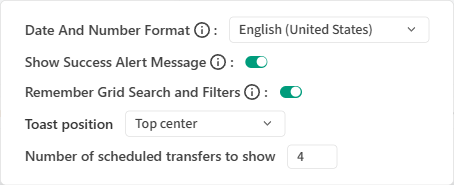
The Settings menu: your personal preferences — language and number format, success messages, remembering grid search & filters, toast position, and the scheduled-transfers count.
| Preference | What it does |
|---|---|
| Language / locale | Sets the display language and regional formatting (dates, numbers) for your account. |
| Notification (toast) position | Where the small pop-up messages appear on screen — for example a corner that doesn't cover the content you are working on. |
| Remember grid search & filters | When on, a list's search text and filters are remembered when you leave and come back, so you don't re-type them. |
| Show success messages | Turns the brief "done" confirmations on or off. Turn them off if you find them noisy; errors and warnings always show regardless. |
| Scheduled-transfers count | Controls how many upcoming scheduled transfers are surfaced at a glance. |
(The exact set of options may grow over time; they are all personal and safe to change.)
Good to know
- These settings are per user and only change your own experience.
- They never change transfers, agreements, Configs or any shared data.
- Clearing your browser data may reset the ones stored in the browser.
Related guides
- In-App Notifications — the notifications these toasts relate to.
- Working with Sort and Filter — the grid search/filter these remember.
Was this article helpful?
That’s Great!
Thank you for your feedback
Sorry! We couldn't be helpful
Thank you for your feedback
Feedback sent
We appreciate your effort and will try to fix the article