TABLE OF CONTENTS
Introduction
This article applies to a situation like this (and is available for System Admin role only):
You have transferred a schedule (one or more times) from a source to a destination using SchedEx.
Then, for whatever reason, and outside the scope of SchedEx, your destination schedule is forcefully overwritten with another schedule's data, or the "same" schedule overwriting its internal Ids (e.g by importing a Safran .spx file into an existing destination schedule).
This breaks the life cycle tracking for all the Planning Objects in receiving side, as the internal identifiers no longer point to "anything valid".
The Reset Receiving Object Reference Mappings option (see screenshot below) allows administrators to clear all receiving-side transfer reference data before the next transfer. This is intended as a recovery tool for situations where the receiving reference database has become corrupted or inconsistent, causing transfer failures or incorrect object mapping.
When to use this option
Use this option only when instructed during troubleshooting or when transfer reference data is known to be corrupted.
Resetting the receiving reference mappings causes the next transfer to behave as if no previous transfers have occurred for the receiving system.
Note: This operation does not delete any business data from the destination system. Only transfer reference data and object mappings are removed.
How it works
- Edit the Exchange Agreement (EA) configuration.
- Enable Reset Receiving Object Reference Mappings.
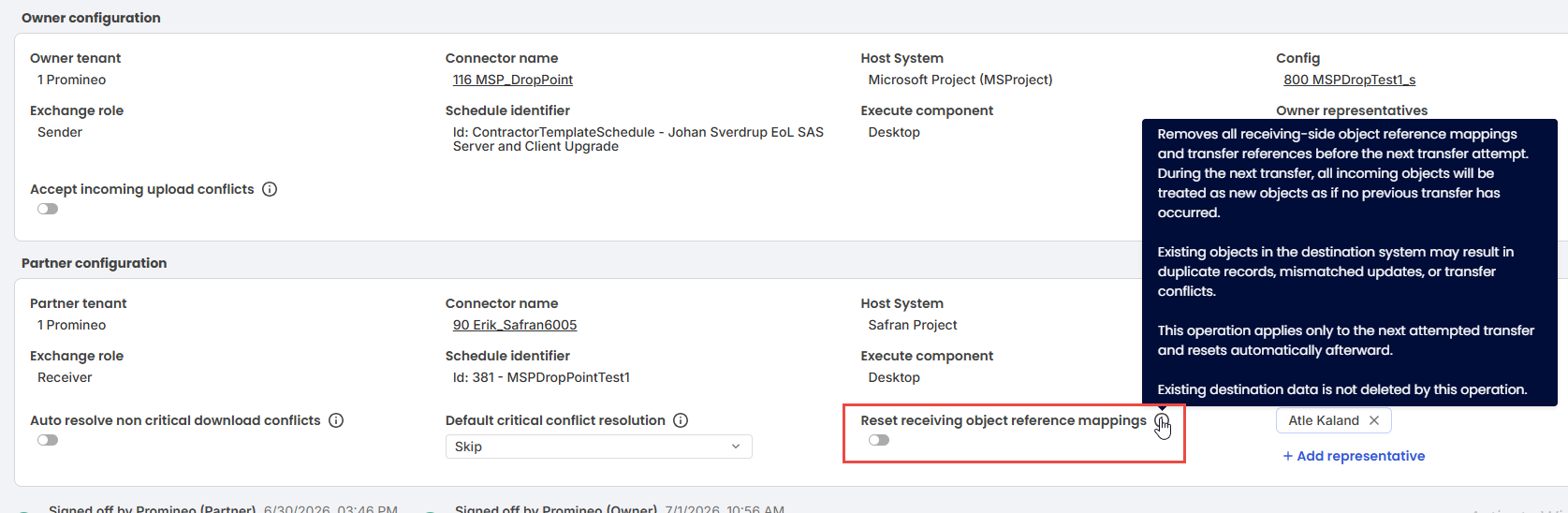
The option (in red frame) for resetting the receiver's object reference mappings, together with tooltip explaining its use. - Confirm the warning message.
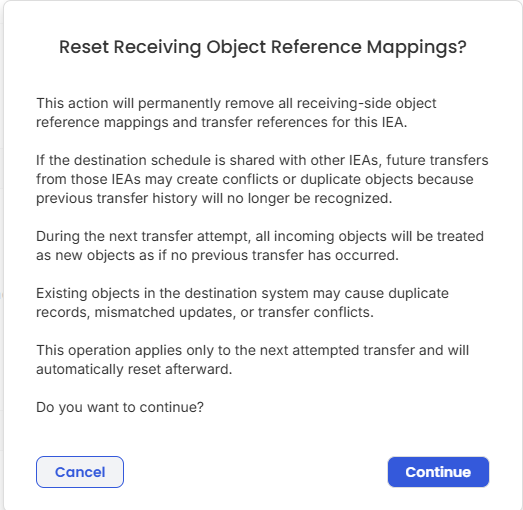 The warning message to confirm before setting the option to "on".
 - Start the next transfer.
Before the download phase begins, the system removes all receiving-side object reference mappings, transfer references, change logs, and related reference data.
After the cleanup:
- The next transfer treats all incoming objects as new.
- The option is automatically reset after the transfer attempt.
- The cleanup is performed only once, even if the transfer later fails.
Important considerations
Because previous object mappings are removed, the destination system can no longer match incoming objects to previously transferred objects. Depending on the existing data in the destination system, this may result in:
- Duplicate records
- Mismatched updates
- Transfer conflicts
Carefully review the destination system before using this feature.
Monitoring the operation
The transfer Event Log records the cleanup process, including:
- A warning when the reset is enabled for a transfer.
- Whether the cleanup completed successfully.
- A summary of deleted reference data by object type.
Example:- Activities: 1523
- Calendars: 14
- Resources: 248
- Resource Assignments: 4321
- Change Logs: 9341
- A warning if no reference data was found to remove.
- An error if the cleanup fails, including the reason returned by the processor.
If the cleanup cannot be completed successfully, the transfer is stopped and the error is recorded in the Event Log.
Was this article helpful?
That’s Great!
Thank you for your feedback
Sorry! We couldn't be helpful
Thank you for your feedback
Feedback sent
We appreciate your effort and will try to fix the article