TABLE OF CONTENTS
- Introduction to the "Source is King"-concept
- Upload Conflicts
- Download Conflicts
- How to change the behavior settings for an EA
- Behavior Summary
- Important Considerations
- Related articles
Introduction to the "Source is King"-concept
The "Source is King" concept defines how data is synchronized between source and destination systems in ShedEx.
Under this principle, the source system is the single source of truth, and the destination system is automatically updated to reflect its state.
Notably: When an object (for example, an activity) is deleted in the source system:
- The object will automatically be deleted in the destination system
- This ensures the destination does not retain outdated or orphaned data
Upload Conflicts
Overview
Upload conflicts occur when the system detects that the ID of an activity (or other planning object) is inconsistent with previously transferred data.
This typically happens when an object is deleted and later recreated with the same ID, or when an activity is renamed to a previously transferred and deleted activity.
Critical and Non-Critical conflicts
Critical conflicts are the ones that cannot (logically or practically) be resolved, and therefore cannot be subject to any "Auto resolve options". They need to be resolved manually before any upload/download can be accepted.
Non-Critical conflicts are the ones that allow for a user choice (per activity), or "automatically resolved", using a pre-defined default setting.
Below, we will look at one example of each kind of such conflict types:
Example Scenario of Critical upload conflict
Consider the following situation where Safran is the receiving Host System for an EA (Exchange Agreement):
- Activities "A", "B", and "C" (in some Host system) have been transferred and received in Safran
- Activity "B" is renamed "C" (I.e. "swapped" via "B" being renamed to "B2", then "C" is renamed to "B" and finally "B2" is renamed to "C")
The reason this case is classified as a "Critical conflict" is that the Safran API will not allow for such a swap of IDs during download, and therefore the service will prevent this from being accepted in the upload. The source system needs to be modified so that such "swaps" of activity codes no longer are present.
Example Scenario of Non-Critical upload conflict
Consider the following sequence for any Host System (Safran, P6, MSProject):
- An activity with ID "A" is successfully transferred
- The activity "A" is deleted in source
- A new activity is created in source with the same ID "A"
In this situation, the system must determine how to interpret the new activity - discussed in next section.
Possible Interpretations for Non-Critical conflict
There are two possible ways to resolve this:
Option 1: Continuation of the Previous Object
The new activity "A" is treated as a continuation of the previously deleted activity.
- Assumes the original activity was deleted unintentionally and recreated
- The system reconnects the new activity to existing tracking/history
Option 2: New Object
The new activity "A" is treated as a completely new object.
- Assumes the original activity was intentionally deleted
- The existing activity "A" in the destination system will be deleted
- A new activity "A" will be created in the destination with the new data
How Conflicts Are Resolved
The correct interpretation depends on the intent of the planner responsible for the schedule.
- If the activity is meant to continue → Option 1 should be applied
- If the activity is truly new → Option 2 should be applied
The uploader will be presented with a list of all such conflicts and each will need to be given a choice of option 1 or 2, alternatively applying "Accept all incoming" to choose option 1 for all. If you want to avoid having to do this choice of "Accept all incoming" every time, there is an option to have it pre-selected (Automatic Resolution):
Automatic Resolution
If you want upload conflicts to be resolved automatically, you can enable:
- Accept incoming upload conflicts (see setting highlighted in the UI below)
When enabled:
- The system defaults to Option 1 (continuation)
- Existing tracking and relationships are preserved without manual intervention
Important Considerations
- Automatic resolution may not always reflect the planner’s intent
- Manual review is recommended when accuracy is critical
- Reusing IDs can lead to ambiguity and should be done with care
Download Conflicts
Download conflicts occur when data from the source is transferred to the destination and discrepancies are detected. The causes for the conflicts are caused by manual changes in destination,
NOTE: If activities are deleted in destination that have been part of a previous transfer, they will be recreated on next transfer to reflect the state in source schedule.
Non-Critical Download Conflicts
- Controlled by: Auto resolve non-critical download conflicts
- Enabled: Conflicts are resolved automatically during transfer
- Disabled: Conflicts must be reviewed and resolved manually
These conflicts typically involve minor differences that do not affect overall data integrity.
Critical Download Conflicts
- Controlled by: Default critical conflict resolution
- Example setting: Stop and resolve conflict
When a critical conflict occurs:
- The transfer is paused
- User intervention is required before the transfer can continue
Critical conflicts may include structural inconsistencies or situations where automatic resolution could lead to data loss.
How to change the behavior settings for an EA
Below we can see the setting present for an EA, where the sender and receiver can choose which options to use:
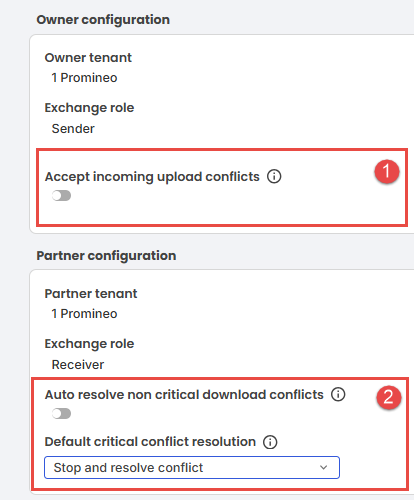
The tooltips shown when hovering over the "information icons":
1. Enable this to automatically resolve upload conflicts by considering conflicting items as existing records.
2a. Enable this to automatically resolve non-critical conflicts by accepting incoming schedule changes.
2b. Select how critical conflicts should be handled when they cannot be resolved automatically during download operations.
The options for choosing how to handle critical download conflicts
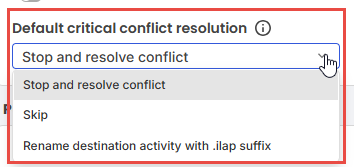 The options for solving critical conflict resolutions for download.
- Stop and resolve conflict: Do not accept download until the destination schedule has manually been changed to avoid the case of conflict(s) (typically renaming activities).
- Skip: The activities will be skipped and not be download to destination system.
- Rename destination activity with ".ilap" suffix: The activity ID in destination will be renamed using a suffix in order to avoid ID conflict(s).
Behavior Summary
With "Source is King" applied:
- The source system governs all updates
- The destination is maintained as a synchronized copy
- Deletions in the source are reflected in the destination
- Conflict handling is configurable, with stricter controls for critical scenarios
Important Considerations
- Changes made in the destination system may be overwritten or removed
- Manual intervention may be required if automatic conflict resolution is disabled
- Critical conflicts are designed to protect data integrity and prevent unintended changes
Related articles
Was this article helpful?
That’s Great!
Thank you for your feedback
Sorry! We couldn't be helpful
Thank you for your feedback
Feedback sent
We appreciate your effort and will try to fix the article