TABLE OF CONTENTS
- Introduction
- Case 1: Safran as Source, SAP as Receiver
- Case 2: Using Safran Text Fields to "point" to SAP operations to update/create
- Config example of mapping data from Safran to SAP
- Data Round-Trip: Returning WorkOrder and Operation IDs to Safran
- Suggested future improvements
Introduction
The use case for transferring data between Safran and SAP (both directions) has been the oldest and arguably the most important one for some of the companies using the solution. The way to set up Configs will vary depending on the specifics of the use case. These have been listed in the following sections, where the challenge of each is described and how it is addressed in the Config.
This article requires some technical knowledge of both SAP and how to do mappings using IDE, and is not recommended for the "average user"...
It tries to capture some "best practices" and provide a map to how to get started with examples from real life..
Case 1: Safran as Source, SAP as Receiver
When exporting activities from Safran to SAP, setting up a mapping to the SAP Hostfield "ORD_OrderHeader" is critical for structuring data. The specific value passed is far less important than its uniqueness:
- Work Order Creation: A new WorkOrder is created for every unique value in this field.
- Operation Mapping: All activities sharing the same unique "ORD_OrderHeader" value are grouped as Operations under that specific WorkOrder, starting with "0010", and using increments or 10 (i.e. next one being "0020")
If Safran is the "sole source of truth" for SAP, i.e. the flow of data is one-directional, then you can ignore the section called "Case 2" below.
Case 2: Using Safran Text Fields to "point" to SAP operations to update/create
This case is only relevant for for bidirectional updates - i.e. when WorkOrders and Operations are allowed to be manually added in SAP and Activities manually added in Safran to update them.
When a project allows for the creation of Activities in both Safran and SAP, there is "no exclusive source of truth for a SAP schedule", Safran must "pinpoint" specific SAP operations to ensure data accuracy. This has currently been achieved in 2 ways for different use cases:
- By mapping dedicated Safran user fields (e.g., Text1 and Text2) to the the ORD_OrderId and OPR_Activity fields in SAP.
- By using the Safran Activity name as the "reference" to the WorkOrder/Activity using 12 digit code. E.g: 222222220010 (Where the first 8 characters, "22222222", references the WorkOrder number and "0010" the SAP Activity number. Note that this "split" of 12 characters into 8 + 4 can easily be achieved using two mapping formulas:
ORD_OrderId uses formula: Sys.Left(Activity.Code, 8)
OPR_Activity uses formula: Sys.Right(Activity.Code, 4).
The SAP Host Fields "ORD_OrderId" and "OPR_Activity" allow Safran to target update of specific Work Order and Activity combinations.
However: When creating new Operations, even if you request the creation of e.g "0031" it will ignore this request and automatically assign the next available number: E.g. If last number was "0020" it will assign "0030".
For future versions of the SAP Gateway, assigning specific Activity number may be supported.
Config example of mapping data from Safran to SAP
This is an example of a mapping used when transferring schedule from Safran to SAP:
| Row | ILAP term | Description | Data type | Direct map to Host field (alias) | Value Transformation Formula |
| 1 | ORD_OrderHeader | SAP Interface Order Identifier | String | uf_text24 (Tekst AO-header) | |
| 2 | ORD_Orderid | Order | String | uf_text5 (AO number) | |
| 3 | ORD_ShortText | Description | String | Sys.Truncate(uf_text24,40) | |
| 4 | ORD_OrderType | Order Type | String | "PM10" | |
| 5 | ORD_Plangroup | Planner group | String | uf_ref4=="HD" ? "SVM" : "SC" | |
| 6 | ORD_Location | Location | String | Sys.GetPartIndex(uf_out1,"§",1) | |
| 7 | ORD_Planplant | Planning plant | String | Sys.GetPartIndex(uf_out1,"§",0) | |
| 8 | ORD_Plant | Plant for WorkCenter | String | Sys.GetPartIndex(uf_out1,"§",0) | |
| 9 | ORD_MnWkCtr | Main work center | String | Sys.GetPartIndex(uf_out3,"§",1) | |
| 10 | ORD_Maintplant | Maintenance plant | String | Sys.GetPartIndex(uf_out1,"§",0) | |
| 11 | ORD_SuperiorNetwork | Subnetwork of | String | Sys.GetPart(uf_text6, "-", "L") | |
| 12 | ORD_SuperiorActivity | Activity | String | Sys.GetPart(uf_text6, "-", "R") | |
| 13 | ORD_WbsElem | WBS Element | String | uf_ref1 + "." + uf_ref28 | |
| 14 | ORD_LocWbsElem | WBS Element | String | uf_ref1 + "." + uf_ref28 | |
| 15 | ORD_StartDate | Basic start date | String | (EarlyStart?.Hour == 0 && EarlyStart?.Minute == 0 && EarlyStart?.Second == 0) ? EarlyStart?.AddHours(5) : EarlyStart | |
| 16 | ORD_FinishDate | Basic finish date | String | (EarlyFinish?.Hour == 0 && EarlyFinish?.Minute == 0 && EarlyFinish?.Second == 0) ? EarlyFinish?.AddHours(17) : EarlyFinish | |
| 17 | ORD_RevisionNumber | Revision Number | String | uf_ref22 == "UK" ? Null : uf_ref22 | |
| 18 | OPR_ControlKey | Control key | String | "PM01" | |
| 19 | OPR_Activity | Operation/Activity Number | String | uf_text17 (SAP operasjon) | |
| 20 | OPR_WorkCntr | Work center | String | Sys.GetPartIndex(uf_out4,"§",1) | |
| 21 | OPR_Plant | Plant | String | Sys.GetPartIndex(uf_out1,"§",0) | |
| 22 | OPR_Description | Operation short text | String | Sys.Truncate(Activity.Description,40) | |
| 23 | OPR_CalcKey | Key for calculation | String | PlannedWorkHours > 0.0 ? 3 : 0 | |
| 24 | OPR_WorkActivity | Work involved in the activity | String | Activity.ResourceAssignments?.Sum(x => x.PlannedHours ?? 0) | |
| 25 | OPR_ConstraintTypeStart | Constraint on the basic start date for the activity | String | "X" | |
| 26 | OPR_StartCons | Constraint for activity start (Basic) | String | (EarlyStart?.Hour == 0 && EarlyStart?.Minute == 0 && EarlyStart?.Second == 0) ? EarlyStart?.AddHours(5) : EarlyStart | |
| 27 | OPR_FinConstr | Constraint for finish of activity (Basic) | String | (EarlyFinish?.Hour == 0 && EarlyFinish?.Minute == 0 && EarlyFinish?.Second == 0) ? EarlyFinish?.AddHours(17) : EarlyFinish | |
| 28 | CNF_FinConf | Partial/Final Confirmation | String | CurrentProgress == 100 ? "X" : "" | |
| 29 | CNF_Complete | Indicator: No Remaining Work Expected | String | CurrentProgress == 100 ? "X" : "" | |
| 30 | CNF_ConfText | Confirmation text | String | "ILAP update by AKSO" | |
| 31 | CNF_ActWork | Actual work | String | Activity.ActualWorkHours | |
| 32 | CNF_RemWork | Remaining work | String | CurrentProgress == 0 ? PlannedWorkHours : (ActualWorkHours/(CurrentProgress/100)) - ActualWorkHours | |
| 33 | OPR_SystemStatus | Operation System Status (comma separated list) | String | uf_ref5?? "PREP" | |
| 34 | OPR_Cancelled | Operation's Cancel Status | Boolean | uf_flag4 (SAP CANC) |
Table showing example of Safran to SAP sending config.
Note that the Receiving Config to SAP is automatically setting default mappings so is trivial to create.
Data Round-Trip: Returning WorkOrder and Operation IDs to Safran
In many cases it is useful for Safran to have knowledge of what WorkOrderId and OperationID SAP created on the transfer from Safran to SAP. This can be implemented making an IEA using the Safran to SAP transfer as a so called "Predecessor IEA", and will be automatically executed in sequence. For such an IEA it is critical that it has set its receiving Host System Parameter to "Only affect specified mappings", and only 2 fields are set. See next section for the example config.
Roundtrip Receiving Config SAP to Safran, example 1
This receiving Safran Config example corresponds to the sender Config example in table above
| Row | ILAP term | Description | Data type | Direct map to Host field (alias) | Formula |
| 1 | OPR_SystemStatus | Operation System Status (comma separated list) | String | uf_text40 (System status from SAP) | |
| 2 | ORD_Orderid | Order | String | uf_text5 (AO number) | |
| 3 | OPR_Activity | Operation/Activity Number | String | uf_text17 (SAP operasjon) |
Table showing example of SAP to Safran receiving config (roundtrip Safran -> SAP -> Safran).
Roundtrip Receiving Config SAP to Safran, example 2
This receiver Config example is relevant if Safran's activity code is used to "point" to WorkOrder and Activity in SAP (see earlier description of the two variants of "Case 2" in beginning of article)
| Row | ILAP Term | Description | Data type | Direct map to Host field (alias) | Formula |
| 1 | ORD_UserStatus | Order User Statuses (comma separated list) | String | uf_text31 (User Status) | |
| 2 | ORD_SystemStatus | Order System Status (comma separated list) | String | uf_text25 (System Status) | |
| 3 | OPR_SystemStatus | Operation System Status (comma separated list) | String | uf_text27 (Opr System Status) | |
| 4 | OPR_WorkActivity | Work involved in the activity | String | uf_dec2 (Plan Hrs(Estimates)/Length) | |
| 5 | CNF_ActWork | Actual work | String | uf_dec15 (EQ SAP EXP HRS) | |
| 6 | Code | String | name | Activity.Code?.Replace("-", "") |
Table showing alternative example of SAP to Safran receiving config (roundtrip Safran -> SAP -> Safran).
Suggested future improvements
Revised Config Design Recommendations
Key Improvements:
- Streamline the Template: Remove all redundant "red" items (see screenshot). By duplicating rows only within the receiving config—specifically for the three "plant fields"—the sender template becomes much leaner.
- Shift Logic to Receiver: Hard-coded and calculated values (like "Remaining Work") should be managed by the receiving config.
Impact:
Implementing these changes would reduce the sending configuration from 34 rows to approximately 16, simplifying the mapping process by half. Additionally, the row marked in red (2) can be deleted, as it is already covered by default mapping.
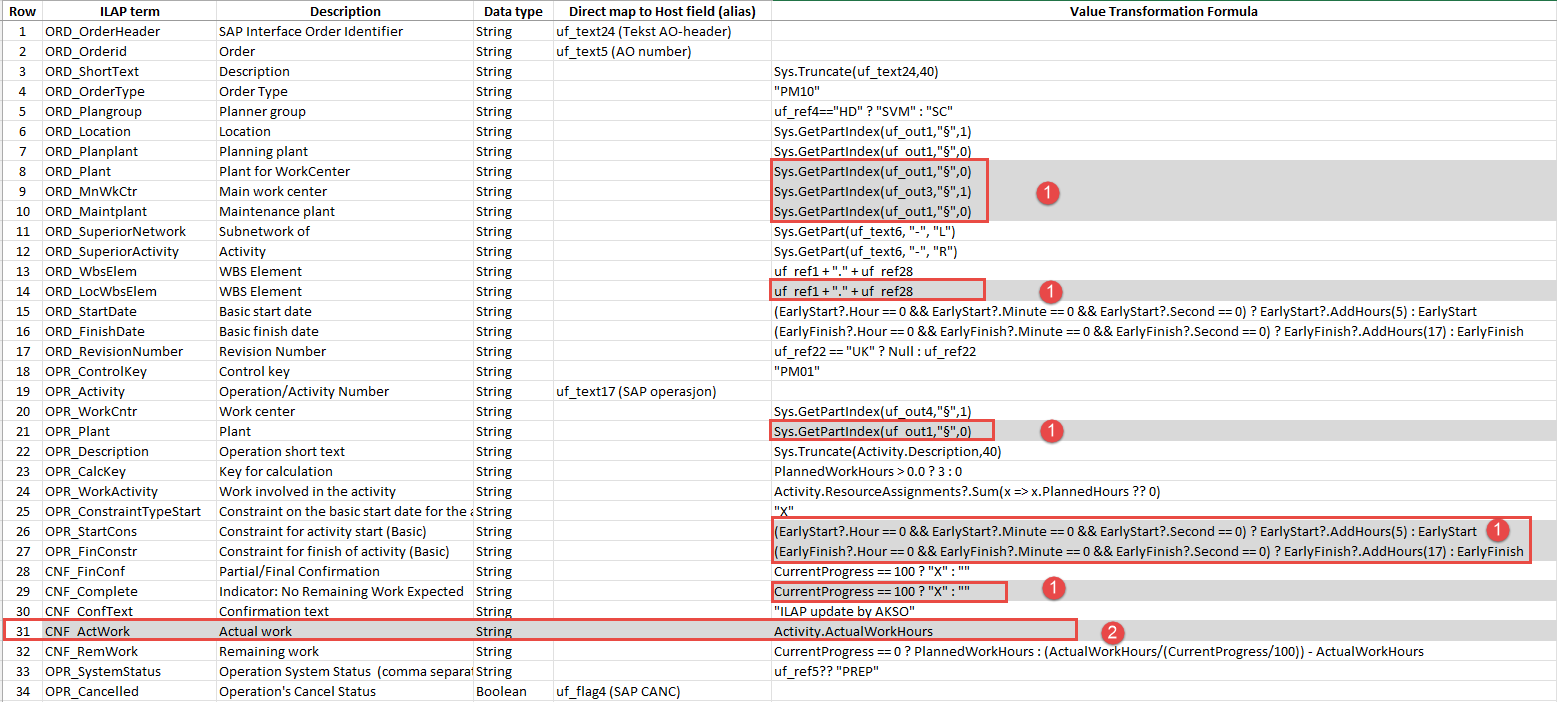 Screenshot showing the current setup in sending Config (from Safran)
Was this article helpful?
That’s Great!
Thank you for your feedback
Sorry! We couldn't be helpful
Thank you for your feedback
Feedback sent
We appreciate your effort and will try to fix the article