TABLE OF CONTENTS
- Introduction
- Where function calls live
- The settings on a function call
- How the pieces fit together
- A worked example
- Who can do this
- Related guides
Introduction
When SchedEx writes into SAP (the receiving side of a transfer), you often need SAP to do more than store the schedule dates — you need it to set a status on the order or the operation, such as releasing it or marking a user status, and to do so at the right moment in SAP's own processing.
Status function calls are how you tell SchedEx to do that. Each one says: on this object, set this kind of status, in this situation, at this point in the sequence — optionally only when a condition is met. They are part of the SAP receiving Config's host-system parameters, so you set them up once on the Config and they flow into the Exchange Agreement.
This guide explains each setting on a function call so you can build the right ones for your SAP process.
Where function calls live
Function calls are defined on the SAP receiving (download) Config, among its host-system parameters. SAP has host-system parameters only for the receiving direction — there is nothing to set on the sending side. You add as many function calls as your process needs; each runs independently. Alongside the function table you’ll also find two SAP receiving options: Only include specified mappings (affect only the fields you’ve mapped) and Stop on error (stop the import if a write to SAP fails).
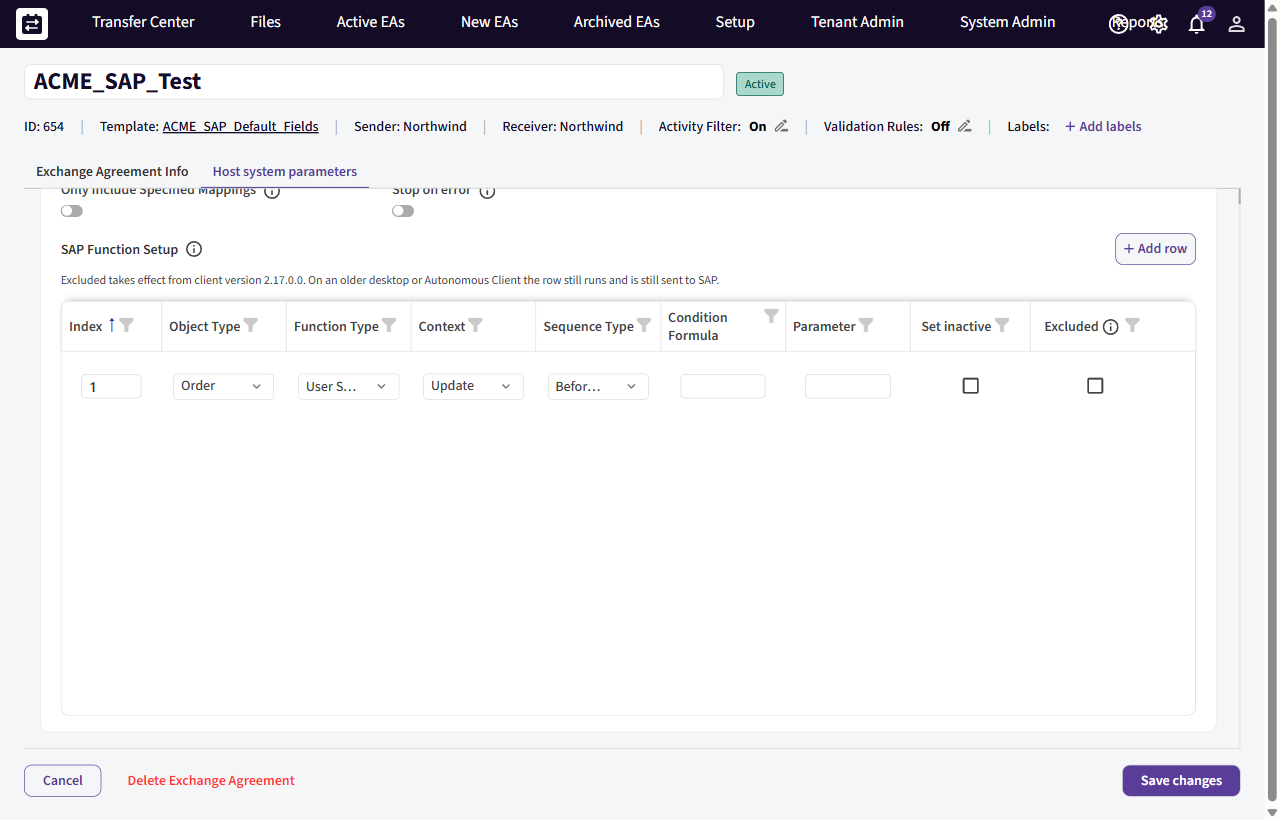
The SAP Function Setup table on an SAP receiving Config: each row sets a status by Object Type, Function Type, Context and Sequence Type, with an optional Condition Formula and Parameter.
The settings on a function call
| Setting | What it controls | Choices |
|---|---|---|
| Object type | Whether the status is set on the SAP order or on an operation within it. | Order · Operation |
| Function type | Which kind of SAP status to act on. | User Status · System Status |
| Context | Whether this call applies when the object is being created in SAP or updated. | Create · Update |
| Sequence | When, relative to SAP's confirmation and update processing, the call is made. | Before Confirmations · Before Update · After Confirmations |
| Condition (formula) | An optional rule that must evaluate true for the call to run — so a status is set only when it should be (e.g. only for a certain activity type). Leave empty to always run. | |
| Parameter | The status value to apply (the status code/key SAP expects). | |
| Index | The order in which this call runs relative to the others, when several apply. | A number |
| Set inactive | Whether the call removes / deactivates the status rather than setting it. | On / off |
| Excluded | Turns the whole row off — its condition isn’t evaluated and no call is made to SAP. Use it to park a function call without deleting it. (Takes effect from client version 2.17.0.0; on an older desktop or Autonomous Client the row still runs and is still sent to SAP.) | On / off |
How the pieces fit together
Read a function call as a sentence:
On the object type, set the function type to parameter — when context — at the sequence point — if condition — (or clear it, if Set inactive is on), running in index order.
Because Context and Sequence are separate, you can, for example, set one status before confirmations are posted and a different one after, and have the "create" case differ from the "update" case. The Condition keeps a status from being applied to objects it shouldn't touch, and Index gives you deterministic ordering when several calls fire for the same object.
A worked example
To release an operation when it is first created in SAP, but only for operations that carry a planned duration, you might define:
- Object type: Operation
- Function type: System Status
- Context: Create
- Sequence: Before Confirmations
- Parameter: the release status your SAP system uses
- Condition: a formula that is true only when the operation has a planned duration
- Set inactive: off
- Index: 1
Add a second call with Context: Update if the same status should be reasserted on later transfers.
Who can do this
Function calls are part of Config setup, so they are configured by a Setup Admin in the Config's owning organization. They then apply through any Exchange Agreement built on that Config.
Related guides
- Host System Parameters for each host system
- How Core Fields are populated on Download to SAP
- How to work with mapping formulas — the formula language used by Condition.
Was this article helpful?
That’s Great!
Thank you for your feedback
Sorry! We couldn't be helpful
Thank you for your feedback
Feedback sent
We appreciate your effort and will try to fix the article