SAP Download: How OrderHeader, OrderId and Activity Number Work
How SchedEx decides which SAP work order and which operation each activity belongs to when a transfer writes data into SAP — and which field combinations work, and which don't.
Who this is for. Anyone setting up or troubleshooting an exchange agreement that writes activities into SAP. It explains the three key mapped fields —
ORD_OrderHeader,ORD_OrderidandOPR_Activity— what happens on the first transfer versus later transfers, and the pitfalls to avoid.
Contents
- The three fields
- The internal reference
- How each activity is placed — the decision flow
- What happens in each combination
- After the first transfer: the internal reference takes over
- Adding a new operation to an already-transferred order
- How new operation numbers are assigned (the +10 logic)
- Formatting matters
- Built-in duplicate protections
- Good to know
- Rules of thumb
- Frequently asked questions
- Known limitations (current behaviour)
1. The three fields
ORD_OrderHeader — the grouping value (always required)
This value is never sent to SAP. It only tells SchedEx which activities belong together: all activities with the same OrderHeader value are bundled into one work order and saved to SAP together. Every activity must have a value — if any activity is missing it, the whole transfer stops with an error.
ORD_Orderid — the SAP work order number
This is the only field SchedEx uses to find an order in SAP. It decides whether the transfer updates an existing order (value provided and found in SAP) or creates a brand-new order (value empty — SAP then assigns the order number itself). If a value is provided but no such order exists in SAP, the whole transfer stops with an error — the value is never used to create an order under that number.
OPR_Activity — the SAP operation number (0010, 0020, …)
This field has one purpose: it lets a new activity attach itself to an operation that already exists in SAP under the given order. It is never used to choose the number of a genuinely new operation — SchedEx always generates that number automatically (highest existing number + 10). If the provided value doesn't exist under the order, the effect depends on the activity: a new activity is simply created as a new operation with an auto-generated number (the provided value is ignored), while a previously transferred activity is skipped with a warning (see section 5).
2. The internal reference
When an activity has been successfully written to SAP (or read from SAP) once, SchedEx stores an internal reference on it that permanently links it to one specific SAP operation.
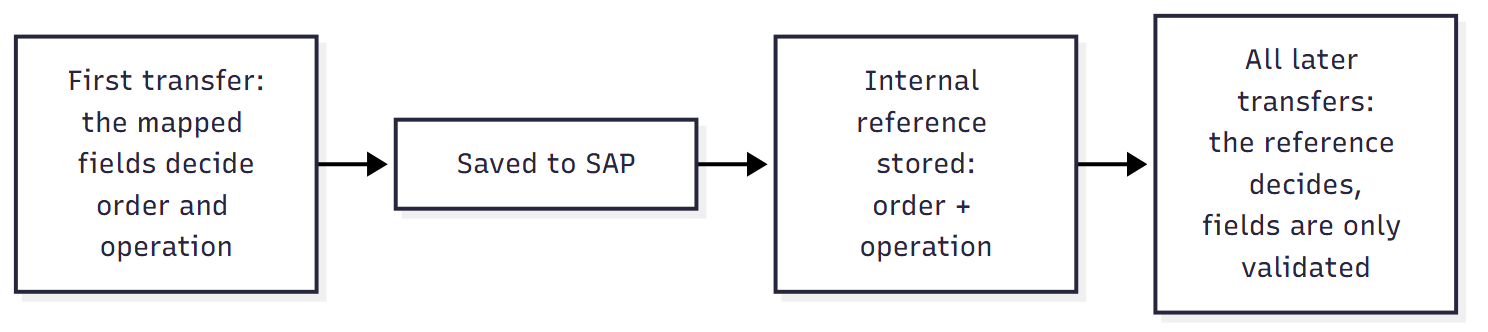
On later transfers:
- An activity with an internal reference is treated as an existing operation and updated in place. Its operation number in SAP never changes, regardless of what OPR_Activity contains — OPR_Activity is then only checked for consistency.
- An activity without an internal reference is treated as a new activity, and the rules below decide where it goes.
3. How each activity is placed — the decision flow
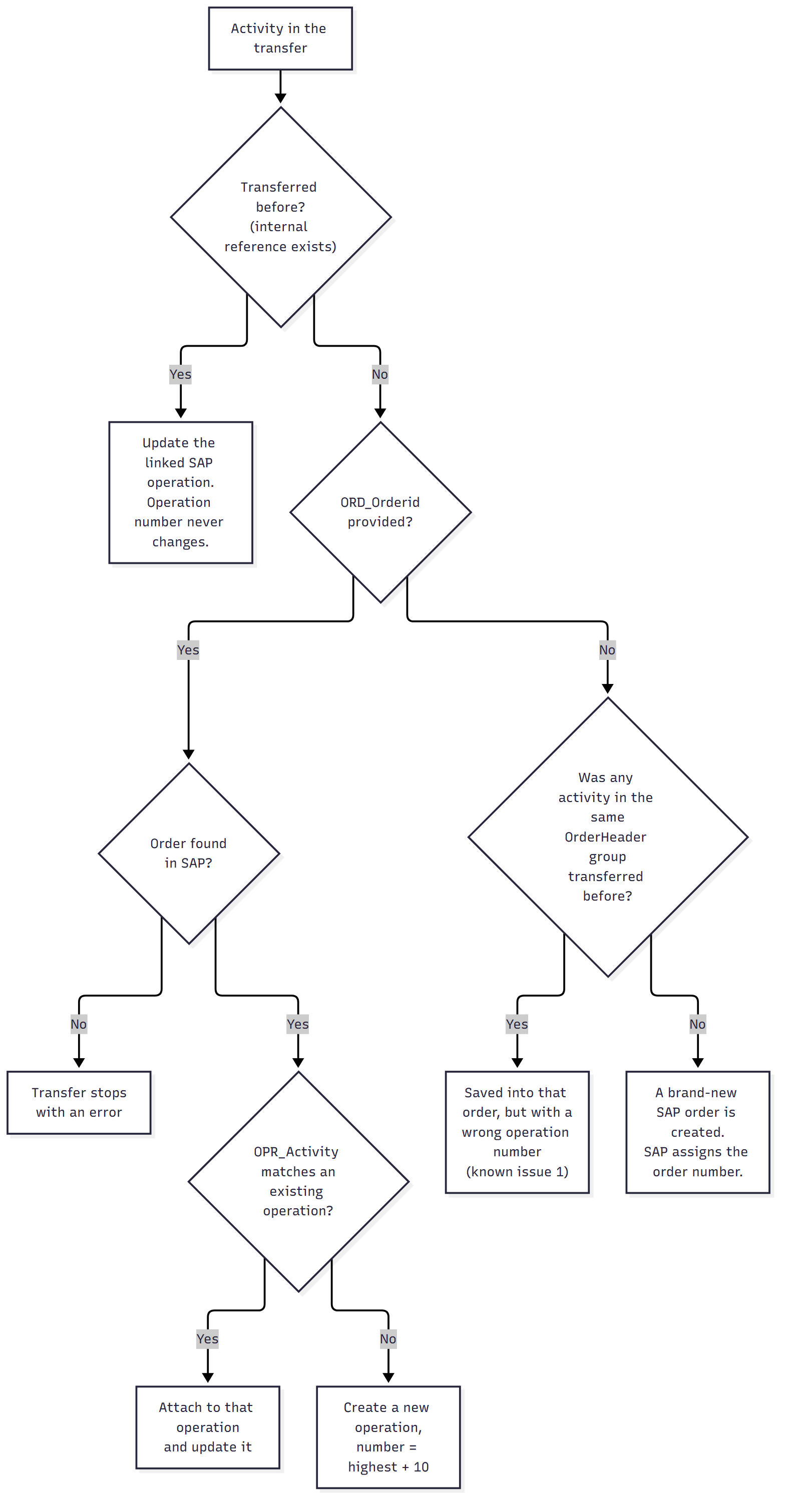
The sections below walk through the same logic in detail.
4. What happens in each combination
OrderHeader missing
| ORD_OrderHeader | What happens |
|---|---|
| Empty on any activity | Transfer stops. The whole transfer fails with a validation error before anything is written to SAP — regardless of what the other fields contain or whether the activities were transferred before. The error lists the affected activities, but note the misleading wording (limitation 3). |
All scenarios below assume OrderHeader is filled in.
New activities (no internal reference yet)
| ORD_Orderid | OPR_Activity | What happens |
|---|---|---|
| Provided, order exists in SAP | Provided, operation exists under that order | Works. The activity is linked to the existing operation and updates it. From then on it carries the internal reference. |
| Provided, order exists in SAP | No such operation, or empty | Works. A new operation is created under the order with an auto-generated number (highest + 10). The OPR_Activity value you provided is not used as the number. |
| Empty | Anything | Creates a new order — intended for creation, risky otherwise. If all activities in the group are new, a brand-new SAP order is created and SAP assigns the number: this is the designed way to create orders. But there is no warning if you meant to update an existing order — OrderHeader is not an identifier in SAP, so SchedEx cannot detect that an order for this work already exists. And if another activity in the group was transferred before, the new one rides along into that order but with a wrong operation number (limitation 1). |
Existing activities (have an internal reference)
| ORD_Orderid | What happens |
|---|---|
| Provided | Works, with validation. The order is read from SAP and the activity is checked before saving: if OPR_Activity is also mapped, its value must still point to the same operation the internal reference points to. If the operation no longer exists, or the number now belongs to a different operation, the activity is skipped with a warning instead of updating the wrong one. |
| Empty | Works, without the safety net. The operation itself is still updated correctly (the internal reference identifies it), but the order is never read from SAP first. That skips the validation above and causes the numbering problem for any new sibling activities in the same group (limitation 1). |
Mixed values within one OrderHeader group
What happens when the activities sharing one OrderHeader value don't all carry the same ORD_Orderid. Example group: 3 activities with the same OrderHeader.
| Scenario | What happens |
|---|---|
| 1 activity has ORD_Orderid (order exists in SAP), 2 have it empty — all new | Works, but by inheritance. The one order number is used to load the order from SAP, and all 3 activities are saved into it with correct numbering. The 2 activities without an id simply ride along — no warning that they were missing it. Risky to rely on: if the one id-bearing activity is ever filtered out of the transfer, the group degrades to the "all empty" case and a new order is created instead of updating the existing one — without warning. |
| 2 activities say order A, 1 says order B — all new | No error, wrong result. The group is still treated as one order. Both order numbers are looked up, but each lookup overwrites the previous one — the activity processed last decides the order. All 3 operations are then saved into that single order; the other order number is silently discarded. Operations intended for order A can end up in order B (or the save fails in SAP). Never mix order numbers under one OrderHeader — give each order its own OrderHeader value. |
| 1 activity has an ORD_Orderid that does not exist in SAP | Transfer stops. The SAP lookup for that order number fails and the whole transfer stops with an error — nothing is saved. This also means you cannot create a new order with a number of your choosing: to create an order, leave ORD_Orderid empty and let SAP assign the number. |
| 1 previously transferred activity whose internal reference points to order A, but ORD_Orderid says order B | Reference wins, validation misfires. The activity (and its group) is saved under order A. But the consistency check for that activity runs against order B (the one the field pointed to), so it can either skip the activity with a confusing mismatch warning or pass validation against the wrong order. The contradiction itself is never reported. |
| 1 previously transferred activity + 2 new ones, ORD_Orderid empty everywhere | Right order, wrong numbers. The group lands in the correct order (inherited from the transferred activity's internal reference), but the 2 new operations get wrong numbers starting at 0010 — limitation 1. |
5. After the first transfer: the internal reference takes over
Once an activity has been transferred, the internal reference — not the mapped fields — decides which SAP operation is updated. The three fields are then only used as follows:
- ORD_OrderHeader — still mandatory and still groups the activities, but it no longer influences which order is updated. Changing the value does not move the operation to a different order.
- ORD_Orderid — used only to load the order from SAP for a safety validation (and for correct numbering of new sibling activities). A changed value does not re-home the operation: the internal reference wins.
- OPR_Activity — never renumbers an existing operation. The number assigned in SAP at creation is permanent.
So yes: if the activity went in with operation number 0010 and a later transfer says OPR_Activity = 20, the operation stays 0010. But "no impact" is only true when the order isn't being validated:
| Situation on a later transfer | Effect of the changed OPR_Activity value |
|---|---|
| ORD_Orderid empty (order not loaded from SAP) | Value is completely ignored — the operation is updated normally via the internal reference. |
| ORD_Orderid provided, value still matches the same operation | Consistency check passes, operation updated normally. |
| ORD_Orderid provided, but no operation with that number exists in the order | The activity is skipped with a warning ("no matching SAP operation activity ID was found") — it is not updated at all. |
| ORD_Orderid provided, and the number now belongs to a different operation | The activity is skipped with a warning (operation mismatch) — again not updated. |
In short: a stale or wrong OPR_Activity on a previously transferred activity never corrupts data, but it can stop that activity from being updated (with only a warning in the log).
6. Adding a new operation to an already-transferred order
A common situation: an order was transferred earlier (its activities carry internal references), and a later transfer contains an additional new activity for the same order. How that plays out depends on what the new activity carries:
| What the second transfer looks like | What happens |
|---|---|
| New activity has ORD_Orderid (same OrderHeader as before) | Works — the recommended way. The order is loaded from SAP, the new operation gets the next free number (highest + 10), and it is saved into the existing order together with any updates to its siblings. After the save, the new activity receives its own internal reference — from the next transfer on it is an "existing" activity like the others. If OPR_Activity is also provided and matches an existing operation, the activity attaches to that operation instead of creating a new one. |
| New activity has no ORD_Orderid, but previously transferred siblings are in the same transfer | Right order, wrong number. The new operation lands in the correct order (inherited from a sibling's internal reference), but gets a wrong number starting at 0010 — limitation 1. The save then typically fails or collides with the existing operation 0010. |
| New activity has no ORD_Orderid, and no previously transferred sibling is in the transfer | Unintended new order. Nothing identifies the order, so a brand-new SAP order is created containing just this operation — almost certainly not what was intended. |
Other things to know about this case:
- One save per order. The new operation and the updates to its sibling operations are sent to SAP together, as one change to the order. If SAP rejects that change, everything for that order fails together (and, depending on the transfer's error setting, other orders may still be saved).
- Operations not included in the transfer are untouched. The change sent to SAP contains only the operations present in the transfer — adding one new operation does not affect, renumber, or remove the order's other operations.
- Multiple new operations in one transfer are numbered in start-date order: highest + 10, + 20, and so on (see the next section).
7. How new operation numbers are assigned (the +10 logic)
When SchedEx creates new operations, it numbers them itself:
- The order's existing operations are read from SAP and the highest operation number is taken.
- Each new operation gets the next free step of 10: highest + 10, then + 20, and so on.
- Within one transfer, new operations are numbered in order of their start date (earliest start gets the lowest number).
- For a brand-new order there is nothing existing, so numbering starts at 0010, 0020, …
Example: the order already has operations 0010–0030, and the transfer adds two new activities.

What the OPR_Activity value does and doesn't do here:
- Value matches an existing operation in the order → the activity attaches to that operation (no new one is created).
- Value does not exist in the order (e.g. you provide 0050 but the order only has 0010–0030) → the value is ignored entirely and the +10 logic is used: the new operation becomes 0040, not 0050. There is no way to choose the number of a new operation.
- Value empty → +10 logic, same as above.
This numbering is also where limitation 1 bites: the "highest existing number" can only be read if the order was actually loaded from SAP, which today requires ORD_Orderid to be filled in. Without it the highest is assumed to be 0 and new operations start at 0010 — colliding with what already exists.
8. Formatting matters
- Operation numbers must match SAP's format exactly. The OPR_Activity comparison is an exact text match against SAP, and SAP stores operation numbers zero-padded to four digits.
0010matches operation 0010 — but10does not. A wrongly formatted value means: a new activity silently becomes a new operation instead of attaching to the existing one, and a previously transferred activity is skipped with a "no matching operation" warning. Always supply the full four-digit value (0010,0020, …). - Order numbers: leading zeros are ignored when matching inside SchedEx.
4000123and004000123are treated as the same order for grouping and caching. The value is however sent to SAP as you provide it, so prefer the order number exactly as SAP shows it. - OrderHeader values are matched the same way — values differing only in leading zeros end up in the same group.
9. Built-in duplicate protections
SchedEx guards against several ways a transfer could claim the same SAP operation twice:
- Two new activities with the same ORD_Orderid + OPR_Activity, where that operation exists in SAP: the mapping is ambiguous, so those activities are not imported (reported as a conflict). Note: if the operation does not exist in SAP, both are simply created as separate new operations with auto-generated numbers — that is not a conflict.
- A new activity pointing at an operation already owned by a previously transferred activity in the same transfer: the new activity is not imported (reported as a conflict) — the existing link wins.
- Final safety net: if, after all resolution, one order would still contain two operations with the same number, the whole transfer stops with an error before anything is saved.
Also good to know about error handling: when saving one order fails in SAP, the behaviour depends on the transfer's error setting — either the transfer stops immediately, or that order is reported as failed and the remaining orders are still saved.
10. Good to know
- Order-level values come from one activity. All order-level fields (ORD_ShortText, ORD_StartDate, plant, work center, …) are read from the first activity of each OrderHeader group — the values on the other activities in the group are ignored for the order. Keep order-level values identical on every activity of a group; otherwise which value wins depends on activity order in the transfer.
- Nothing is ever deleted in SAP. The SAP transfer only creates and updates. If an activity stops being included in the transfer, its operation simply stays in SAP as it was — it is not removed, closed, or changed. Removing operations or orders must be done in SAP itself.
- How activities appear after a transfer. Once saved, SchedEx identifies each activity as order number – operation number (for example
4000123-0010) — this is the code you see in transfer logs and reports. For brand-new orders, the code only becomes known after the save, because SAP assigns the order number. - Choosing a good OrderHeader value. Use a value that is unique per intended SAP order, identical on all activities of that order, and stable from transfer to transfer — typically the sending system's own order/work-package key. Avoid values that can collide after trimming leading zeros (see section 8).
11. Rules of thumb
- To update existing orders and operations: always map ORD_Orderid. Everything is validated and numbered correctly.
- To create a brand-new order: leave ORD_Orderid empty for all activities in that OrderHeader group. SAP assigns the order number; SchedEx numbers the operations 0010, 0020, …
- To attach a new activity to an operation that already exists in SAP: map both ORD_Orderid and OPR_Activity, and use SAP's exact four-digit format.
- Avoid mixing: don't put activities that belong to different SAP orders under the same OrderHeader value, and don't add new activities to an existing order without mapping ORD_Orderid.
12. Frequently asked questions
Q: I changed OPR_Activity on an activity that was already transferred — why did nothing change in SAP?
Operation numbers are permanent once created. After the first transfer the activity is linked to its SAP operation by the internal reference, and OPR_Activity is only used as a consistency check. If the new value points to nothing (or to a different operation) and ORD_Orderid is mapped, the activity is skipped with a warning instead of being updated — check the transfer log.
Q: I set OPR_Activity to 0050 for a new activity — why did it become 0040?
You cannot choose the number of a new operation. If the provided value doesn't match an existing operation in the order, it is ignored and SchedEx assigns the next free number (highest existing + 10). OPR_Activity only works as a way to attach to an operation that already exists.
Q: Why did SchedEx create a second SAP order instead of updating the existing one?
Because no activity in that OrderHeader group carried the order number in ORD_Orderid, and none of them had been transferred before. OrderHeader is not an identifier in SAP — only ORD_Orderid identifies an order. Map ORD_Orderid whenever the order already exists.
Q: Why do my new operations get number 0010 and fail, when the order already has operations?
The transfer didn't carry ORD_Orderid, so SchedEx could not read the order's existing operations and started numbering from scratch (known limitation 1). Map ORD_Orderid on the activities and the numbering will continue correctly from the highest existing operation.
Q: My activity was skipped with "no matching SAP operation activity ID was found" — what does it mean?
The OPR_Activity value doesn't match any operation in the order. The most common cause is formatting: SAP stores operation numbers zero-padded to four digits, and the comparison is exact — send 0010, not 10. It can also mean the operation was deleted or renumbered in SAP after the earlier transfer.
Q: Can I renumber, move, or delete an operation from SchedEx?
No. Operation numbers are permanent, the link between an activity and its SAP operation cannot be re-pointed to another order, and transfers never delete anything in SAP. All three must be done in SAP itself.
Q: If I remove activities from the transfer, will their operations be removed in SAP?
No. A transfer only creates and updates the operations it contains. Anything not included is left exactly as it was.
Q: Two unrelated activities accidentally got the same OrderHeader value — what happens?
They are treated as one order. If they point to different SAP orders, there is no warning — the whole group is saved under one of the two orders, which is unpredictable (known limitation 2). Keep OrderHeader values unique per intended SAP order.
13. Known limitations (current behaviour)
- New operations get the wrong number when ORD_Orderid is empty.
If an order already exists in SAP but the transfer doesn't carry its order number in ORD_Orderid, SchedEx never reads the order's existing operations. New activities in that group are then numbered starting at 0010 — even though operation 0010 (and others) already exist. The save then fails in SAP or collides with the existing operation. This happens even when the group contains previously transferred activities. Workaround: always map ORD_Orderid when adding activities to an existing order. - Conflicting order numbers in one group are not detected.
If activities under the same OrderHeader value point to different SAP orders (different ORD_Orderid values, or an internal reference that disagrees with ORD_Orderid), SchedEx does not warn — the whole group is simply saved under whichever order number was resolved last, which is unpredictable. Workaround: keep one OrderHeader value per SAP order and identical ORD_Orderid values within a group. - The "missing OrderHeader" error message is misleading.
When an activity has no OrderHeader value, the transfer stops with an error that talks about "operations referencing the same activity key more than once" — which has nothing to do with the actual cause. If you see that message, check for activities with an empty ORD_OrderHeader value first.
Was this article helpful?
That’s Great!
Thank you for your feedback
Sorry! We couldn't be helpful
Thank you for your feedback
Feedback sent
We appreciate your effort and will try to fix the article