TABLE OF CONTENTS
- Introduction
- Before you start
- Where to find the setting
- Options reference
- What the rebuild does not touch
- How to change the option
- Examples
- How this works with other receiving parameters
- Avoiding common errors
- When things look empty or blocked
- Reading the transfer log
- Related features
- Tips
Introduction
When an Exchange Agreement (IEA) writes activities into your Safran or Primavera P6 schedule, the Resource Assignment Rebuild Option decides what happens to the resource assignments that already exist on those activities.
You can choose to keep them and only update what comes in, to replace assignments for the resources your partner sends, or to replace all assignments on every activity in the transfer. Use this setting when your partner's resource loading should be the single source of truth, for example when they restructure or remove resources and you don't want old assignments left behind.
Before you start
- You must be on the receiving side of the IEA. This is a receiving (import) parameter. Only the party whose host system receives the data can change it. If you are the sender, you can see it but not edit it.
- Your receiving host system must be Safran or Primavera P6. Other host systems don't have this option.
- The resources must exist in your schedule. ILAP Flow can only recreate an assignment if the resource it points to exists in the receiving system. If your partner may send new resources, also turn on Allow Append Resources (Safran) or Allow append resource (P6).
Where to find the setting
- Open the Exchange Agreement (EA).
- Go to the host system parameters, then select the Receiver tab or section.
- Find Resource Assignment Rebuild Option.
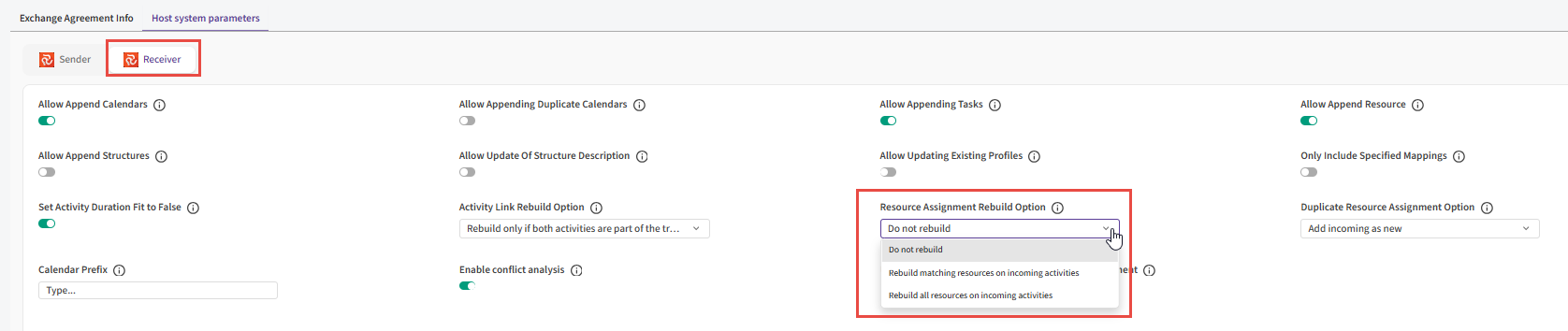
The value you see on a new EA comes from the receiving configuration. You can override it per EA.
Options reference
| Option | What happens on each transfer | When to use it |
|---|---|---|
| Do not rebuild (default) | Existing assignments are kept. Assignments ILAP Flow transferred before are updated, and new ones are added. Nothing is deleted. | You add or adjust resources locally and want to keep that work. |
| Rebuild matching resources on incoming activities | On each incoming activity that already exists in your schedule, ILAP Flow deletes all existing assignments for the resources your partner sends on that activity, then recreates them from the incoming data. Assignments for other resources on the same activity are left alone. | Your partner owns the loading of specific resources, but you add your own resources to the same activities. |
| Rebuild all resources on incoming activities | On each incoming activity that already exists in your schedule, ILAP Flow deletes every resource assignment, then recreates only the incoming ones. | Your partner's resource loading should fully replace yours on the activities they send. |
Warning: The rebuild options permanently delete resource assignments in your Safran or P6 schedule before the new ones are written. Anything you entered on those assignments locally (for example values in fields that aren't part of the mapping) is lost. ILAP Flow can't undo this, so take a backup or baseline first if you're unsure.
What the rebuild does not touch
- Activities that aren't part of the transfer. If an activity is filtered out or not sent, its assignments stay as they are.
- Activities that are new in your schedule. There is nothing to delete, so incoming assignments are simply created.
- Other resources on the activity, when you use Rebuild matching resources on incoming activities.
How to change the option
- Open the EA and go to the Receiver host system parameters.
- In Resource Assignment Rebuild Option, select the option you need (see the table above).
- Save the EA.
The new option is used from the next data transfer.
Tip: Run a test transfer, or compare a single transfer's result in your schedule, before you switch an active EA to a rebuild option.
Examples
Say activity A100 in your schedule has three assignments: Welder (from your partner), Pipefitter (from your partner), and Supervisor (you added it yourself). The next transfer sends A100 with Welder only.
| Option | Result on A100 after the transfer |
|---|---|
| Do not rebuild | Welder (updated), Pipefitter (kept), Supervisor (kept) |
| Rebuild matching resources on incoming activities | Welder (recreated), Pipefitter (kept), Supervisor (kept) |
| Rebuild all resources on incoming activities | Welder (recreated). Pipefitter and Supervisor are deleted. |
Warning: With Rebuild all resources on incoming activities, an incoming activity that arrives with no resource assignments loses all its existing assignments in your schedule.
How this works with other receiving parameters
- Duplicate Resource Assignment Option (Safran only). This setting decides what happens when an incoming assignment uses a resource that's already assigned to the activity. The rebuild runs first, and assignments it deleted no longer count as duplicates. With Rebuild matching resources on incoming activities, every existing assignment for the incoming resources is removed first, so in practice the duplicate option only matters when you use Do not rebuild.
- Activity Link Rebuild Option. This setting works the same way, but for activity links (relationships). It's set separately.
- Allow Append Resources / Allow append resource. These control whether new resources can be created in your system. The rebuild only handles assignments.
Avoiding common errors
| If you see… | It means… | Do this instead |
|---|---|---|
| Warning in the transfer log: "Resource assignment for resource 'X' on activity 'Y' could not be updated because the record no longer exists in the destination." | Someone deleted an assignment in your schedule that ILAP Flow transferred earlier. With Do not rebuild, ILAP Flow skips it instead of recreating it. | Pick a rebuild option. ILAP Flow then recreates assignments that were deleted manually. |
| Warning (Safran): "Ignoring duplicate resource assignment for resource 'X' on activity 'Y' as per configuration." | Duplicate Resource Assignment Option is set to Do not add incoming, and the resource is already on the activity. | Use Rebuild matching resources on incoming activities, or change the duplicate option. |
| Assignments are missing after a transfer | The resource doesn't exist in your schedule, so the assignment couldn't be created. | Create the resource, or turn on Allow Append Resources. |
| Local assignments disappeared | A rebuild option is selected, and the activity was part of the transfer. | Use Rebuild matching resources on incoming activities or Do not rebuild if you need to keep local resources. |
When things look empty or blocked
- The option isn't shown: your receiving host system isn't Safran or P6, or you're looking at the Sender parameters.
- The option is greyed out: you're on the sending side of the IEA, or you don't have edit rights on the IEA. Ask the receiving side's responsible person to change it.
Reading the transfer log
When a rebuild option is active, the receiving transfer log shows lines like these:
Rebuilding resource assignments. Option: Rebuild all resources on incoming activitiesRebuilding resource assignments: Deleting 42 resource assignment(s) from Safran.(orfrom Primavera.)
If the second line is missing, ILAP Flow found nothing to delete for that transfer.
Related features
- Activity Link Rebuild Option: the matching setting for activity links. (link TBD)
- IEA host system parameters overview. (link TBD)
Tips
- Start with Rebuild matching resources on incoming activities. It cleans up your partner's resources without touching yours.
- Keep this setting the same across IEAs that send to the same schedule, so results stay predictable.
Was this article helpful?
That’s Great!
Thank you for your feedback
Sorry! We couldn't be helpful
Thank you for your feedback
Feedback sent
We appreciate your effort and will try to fix the article